Remote IPC Testing: Why the LockDown Browser Practice Exam Matters
Jun 06, 2026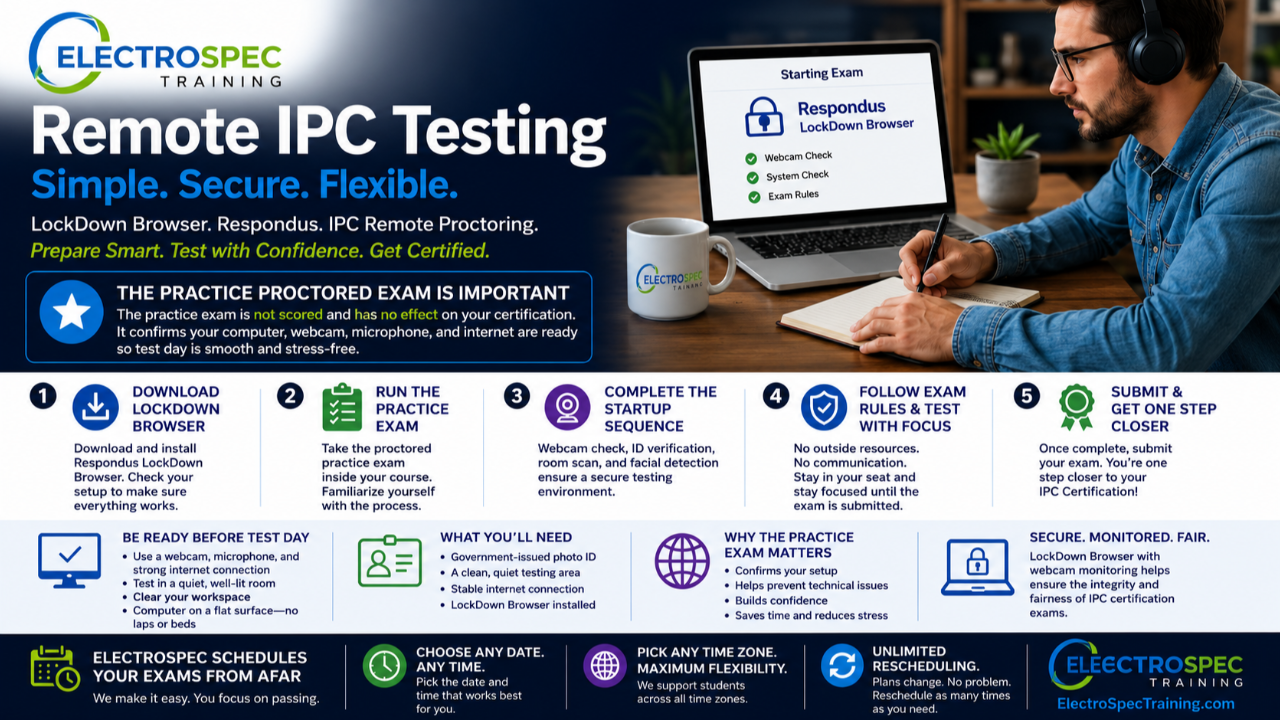
One of the biggest advantages of IPC certification today is that many exams can be completed remotely.
That means students do not always need to travel, sit in a classroom, or wait for a specific testing location. With remote proctoring, students can complete IPC certification exams online using their own computer, webcam, microphone, and internet connection.
But there is one step students should not skip:
Complete the proctored practice exam before test day.
The practice exam is not about testing your IPC knowledge. It is about making sure your computer, camera, microphone, internet connection, and LockDown Browser setup are ready before your real certification exam begins.
That preparation can make the difference between a smooth test day and a stressful one.
What Is LockDown Browser?
IPC remote proctored exams use Respondus LockDown Browser with webcam monitoring.
LockDown Browser is a secure testing browser. It prevents students from accessing other websites, applications, or outside resources during the exam. Once the exam begins, the student stays inside the testing environment until the exam is completed and submitted.
For remote IPC exams, the student will also use a webcam and microphone as part of the proctoring process.
The IPC Remote Proctoring User Guide lists basic system requirements, including Windows or Mac operating system compatibility, webcam and microphone, broadband internet connection, and administrator rights to download required software when needed. It also notes that students using company-issued computers may need help from their IT department to install the software.
That is why setup should be completed early.
Do not wait until exam time to find out your company laptop blocks the download, your camera does not work, or your internet connection is unstable.
Why the Proctored Practice Exam Is So Important
IPC provides a remotely proctored practice exam inside remote proctoring courses.
This practice exam allows students to become familiar with the remote exam setup and confirm that LockDown Browser is working correctly. The guide also notes that the practice exam is not scored and has no effect on certification.
That is important.
The practice exam is not something to fear.
It is a system check.
It gives students a chance to download LockDown Browser, test the setup, perform a webcam check, understand the startup sequence, and get comfortable before the actual exam.
This is especially helpful for students who are new to remote testing.
Even experienced students should run the practice exam when using a new computer, new location, new internet connection, or company-issued device.
Downloading and Checking LockDown Browser
After the student enters the remote proctored course in IPC Edge, they will see the proctored practice exam link.
From there, first-time remote proctoring students can download LockDown Browser. After installation, students can return to the course and use the setup check to make sure the browser installed correctly.
The most common issue is waiting too long.
If a student tries to install LockDown Browser right before the real exam and discovers they do not have administrator rights, the exam can become stressful quickly.
That is why ElectroSpec strongly recommends completing the practice exam and setup check well before exam day.
What Happens During the Startup Sequence?
Before the exam begins, LockDown Browser walks the student through a startup sequence.
This includes agreeing to terms of use, checking webcam and microphone function, reviewing exam instructions, taking a student photo, showing government-issued photo identification, scanning the testing environment, and confirming facial detection.
The guide explains that students must agree to terms before using remote proctoring and then complete webcam verification by recording a short video.
Students are also reminded not to access outside resources such as phones, tablets, notes, books, or other materials unless specifically allowed, and not to communicate with other people during the exam.
This process is simple when students know what to expect.
It can feel intimidating when students see it for first time during actual exam.
That is another reason practice exam matters.
Preparing Your Testing Area
Remote testing also requires a proper test environment.
Students should choose a quiet location where they will not be interrupted or distracted. The IPC guide specifically recommends avoiding rooms where children or other people are present and turning off television, radio, music, and similar distractions.
Internet connection matters too.
Students should make sure their connection is strong and consistent, run webcam and system/network checks before starting, and avoid shared internet activity that could slow the connection, such as streaming video.
Students should also place the computer on a flat, hard surface such as a table or desk and sit in a chair during the exam. The guide specifically warns against placing the computer on a lap, bed, couch, or floor.
These details matter because remote proctoring depends on a stable testing environment.
A clean setup reduces interruptions, flags, and technical problems.
Photo ID, Room Scan, and Facial Detection
Students will also be asked to take a photo and show government-issued photo identification.
The guide instructs students to position their face in the picture window, take a picture, then hold identification to camera and take another picture.
Students will then complete an environment check.
This includes showing that the area around the computer is clear of papers, books, phones, and other materials. The student records a short video of the area around the computer and can review the video before continuing.
Finally, facial detection confirms the student is clearly visible before the exam begins. The guide also reminds students that LockDown Browser prevents access to other websites or applications and that students cannot exit until the test is completed and submitted.
Again, this is not difficult.
But students should know what is coming.
The practice exam lets them experience the process before certification is on the line.
Remote Proctoring Is a Great Option When It Is Managed Correctly
Remote proctoring gives students flexibility.
It allows certification testing without travel.
It supports students in different states, countries, shifts, schedules, and time zones.
But remote testing works best when students prepare their computer and environment ahead of time.
That means:
Complete the practice proctored exam.
Install LockDown Browser early.
Check webcam and microphone.
Use a strong internet connection.
Prepare a quiet room.
Clear the workspace.
Have government-issued photo ID ready.
Avoid waiting until exam time to troubleshoot.
These steps help protect the student’s testing experience and reduce unnecessary stress.
ElectroSpec Makes Remote IPC Testing Flexible
At ElectroSpec, we understand that students and companies need flexibility.
Many students are working around production schedules, shift work, customer deadlines, travel, and different time zones. That is why remote testing is such a valuable option.
ElectroSpec schedules IPC remote proctored exams from afar and works to give students maximum flexibility.
Students can request the date and time that works best for them.
They can choose testing times across time zones.
They are not locked into one classroom schedule.
And when life or production needs change, ElectroSpec supports rescheduling.
That service matters.
Training should not become harder than it needs to be. Certification should be organized, flexible, and student-friendly.
Bottom Line
Respondus LockDown Browser and IPC remote proctoring make online IPC certification possible, but students should take setup seriously.
The proctored practice exam is one of the most important steps because it confirms the computer, webcam, microphone, internet connection, and testing environment are ready before the real exam.
Remote testing works best when students prepare early.
ElectroSpec helps make that process easier by supporting flexible remote exam scheduling, multiple time zone options, and rescheduling when needed.
IPC certification should be accessible.
Remote proctoring makes that possible.
ElectroSpec helps make it practical.
IPC-A-610 CIS Certification — ElectroSpec